This is a quick guide on how to think about and use the Meta Calendar in Bifrost.
What “Meta” Means
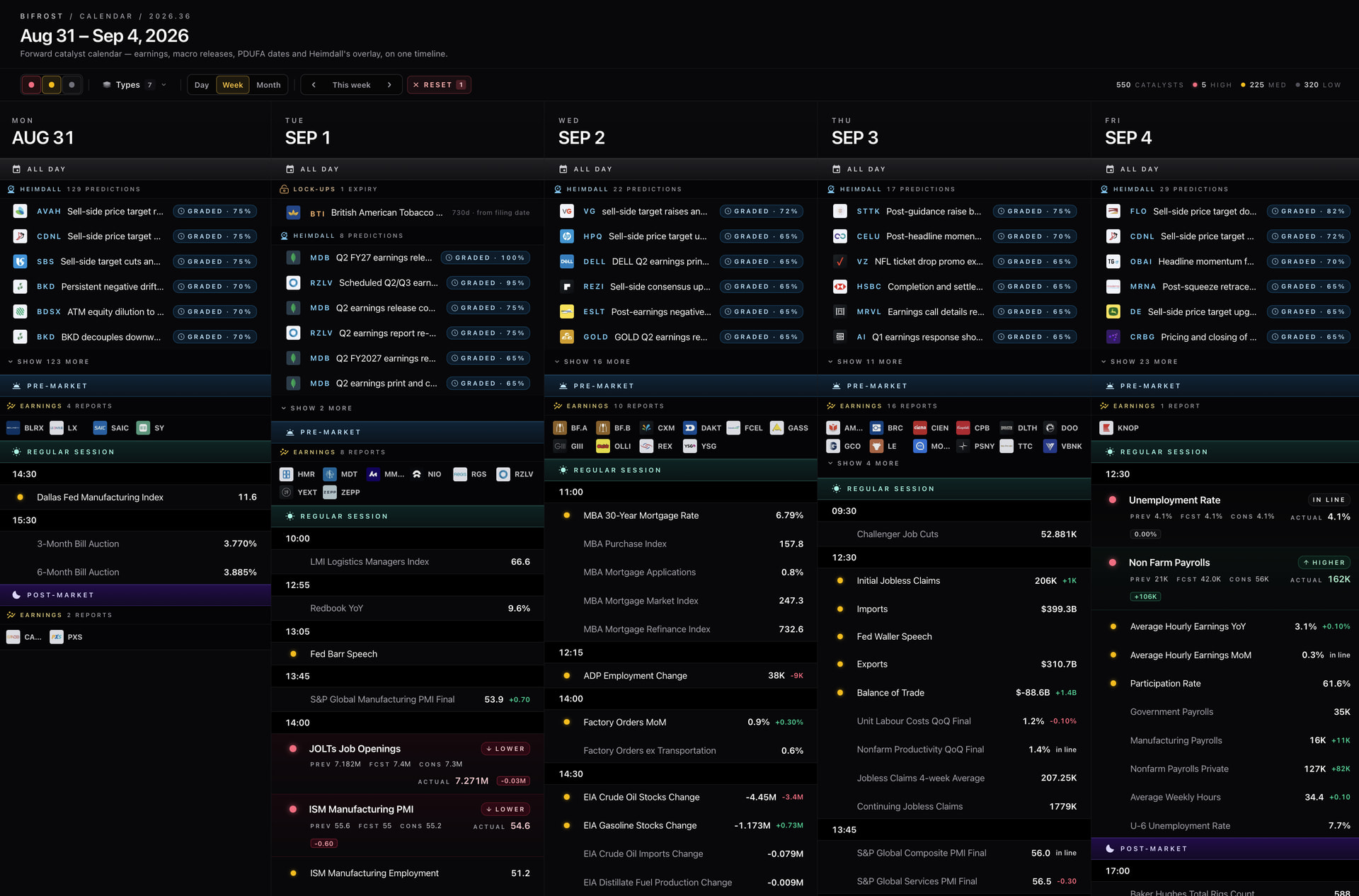
The Meta Calendar in Bifrost is a unified surface for all dated events.
Traditionally calendars specialize, you have an Economic Calendar, Earnings Calendar, etc. Meta Calendar instead combines these into a single surface, adding in data harvested via Nexus and dates generated by Heimdall. This forms a singular calendar that elegantly displays everything that matters on a given day, what the market keeps alongside what the model keeps and that’s what makes it “meta”.
The Problem It Solves
I’ve said this before and it’s still the truth: the thing this community is worst at is remembering to position for things that are farther out. We’re good at the catalyst that’s on the board today. We’re bad at the one that’s three weeks out, that we all knew about, that nobody set a reminder for.
It’s the part of the system whose job is to make sure you’re looking at the right week before the right week is over and that on every given day, you know everything you need to know before market opens.
What’s On It
- Macro - scheduled releases with impact, consensus and prior on the row. FOMC, CPI, PPI, NFP, sentiment, housing. The consensus is there because the print isn’t the trade, the surprise is.
- Earnings - every reporter pulled from both the web and confirmed by Nexus.
- PDUFA - FDA decision dates, pulled from filings and the FDA’s own docket.
- Lock-up expiries - read straight out of the prospectus by Nexus.
- Holidays and early closes - so you don’t release Bifrost on a day the market is closed.

- Executive schedule - what the administration has on the docket.
- Signals - a signal’s window closing. When you see one of these, the setup it’s attached to is about to lapse whether or not you’ve acted on it.
- Predictions - a projection reaching its closing date.
Getting Around

Three views. Week is the default: five columns, Monday to Friday. Day is one day expanded, with a mini-month on the right for jumping around. Month is the grid for scanning far out, which is where PDUFAs and lock-ups three months away live.
Filters. Two sets of toggles, everything on by default. Impact: High, Med, Low. Type: Macro, Earnings, PDUFA, Lock-up, Holiday, Executive, Signals, Predictions. The stats strip next to them counts what’s in the window you’re looking at: total catalysts, and how many are High / Med / Low. Reset puts everything back. On mobile the filters sit behind one button with a badge for how many are applied.
The workspace pane. The Calendar also runs as a panel inside the workspace: the next ten days, compact. Same data, no filters. It’s the glance version; the page is the reading version.
How To Use It
Walk the week before the week. Sunday night, next seven days. What’s tracked, what’s macro, what windows close. That’s the whole ritual. Five minutes.
Treat a Signal closing like an expiry, because it is. If a signal’s window is closing this week and you’re in it, you need a reason to still be in it that isn’t the signal.
Watch the Predictions. When a projection date arrives, it occasionally means that something may or may not be happening and there are sometimes ramifications attached.
Click through to the arc. A date on the calendar is a “when.” The arc is the “what” and the “why.” Don’t trade a date.
What It Isn’t
It’s not a scanner and it’s not a signal. A date is not a thesis. The Calendar tells you when to look. The arc tells you what you’re looking at. Heimdall tells you what it thinks. You decide.